Reflection blog.

Com 210

Reflection post

Ebrahim.

To wrap up this semester I had a great time in this class. Being able to attend class and also work on my homework in class allowed me to ask my TA questions on my homework to insure a good grade. Needing a laptop in this class is very crucial, keeping up with assignments and checking blackboard on a consistent basis helped me greatly end this lass. Having all the material online allowed me to see the work before I went to class or allowed me to not even have to go to class making it extremely convenient.                       Gaining a rhythm made it easier on turning in assignments because I knew when they would be due. My favorite project was the final video I had to make with premiere pro CC. I like it because working out is such a nice feeling, so working out on camera made me feel even better. I enjoy editing photos and videos a lot and being able to learn new techniques with this program was a very fascinating experience for me. I was able to add transition effects which turned out really nice. I also learned many other techniques such as adding a title, and adding music to my video. The skills I was able to learn from the tutorial for Premiere Pro CC will help me a lot in the future. I believe my major has much more to do with the making of these types of videos.

The level of difficulty for this class was high the skill needed to learn and master the programs were not easy. None the less I pushed through knowing that one day soon I will use these skills and when I use these skills I want to be sharp and know what I am doing thank you com210 for teaching me perseverance.
Video Story Final


In this assignment I attempted to rely heavily on my topic, therefore I incorporated working out into the picture. In the video I created, I was in a gym stretching and doing several arm work out demonstrations. I did curls and lateral extensions which works the entire arm as well as some tricep workouts which made up the total of 01:05 mins. Transition effects such as Dissolve to black and fade transition were used to transition between different workout clips. I filmed four workout clips in total, the first clip was more of an establishment shot where I show the entire gym, and the following three clips are workout demos. Razor cut tool was used to cut certain parts of the video that was unnecessary. Audio files such as a narration was later on added to the video clip to explain and guide the viewer through the process.I took your comments into consideration.

draft 2 Friday

In this assignment I attempted to rely heavily on my topic, therefore I incorporated working out into the picture. In the video I created, I was in a gym stretching and doing several arm work out demonstrations. I did curls and lateral extensions which works the entire arm as well as some tricep workouts which made up the total of 01:05 mins. Transition effects such as Dissolve to black and fade transition were used to transition between different workout clips. I filmed four workout clips in total, the first clip was more of an establishment shot where I show the entire gym, and the following three clips are workout demos. Razor cut tool was used to cut certain parts of the video that was unnecessary. Audio files such as a narration was later on added to the video clip to explain and guide the viewer through the process. The video was used as a constructional method to view a workout which is strongly dealing and relating to my topic. Having the viewer view a visual allows for them to get the whole idea of the picture and how each and every workout should be done the proper way. Taking breaks in-between workouts are very important, and by taking a break it doesn’t necessarily mean stop everything your doing, you can stretch out a little during break time or take deep breaths, or even drink some water to help you stay hydrated. The use of premiere pro cc has allowed me to have more confidence when dealing and orchestrating with video editing and composing. I was able to compose this final piece of my topic related video without using any tutorials. I am very confident that in the future if I had to use this program to compose any other video or audio related work, it would be very easy for me!

Story draft

I Focused on my topic which is working out so I implemented videos of me working out. I have 4 videos in this take. Thank you.

Lift one is a video of me doing triceps with the weight machine 3 sets of 10.

Biceps with dumbbells 3 sets of ten.

Extension raise working the entire arm 3 sets of ten.

A video of the gym as well as a little stretch.

Premiere pro cc


The 3 images I chose to use where the laptop and the oatmeal container, were the first two subjects. The editing used was difficult but I can see how being able to use this adobe program could be useful later. The different angles are a little tricky when dealing with the zoom in aspect and the establishment photo. I begun to see the challenges in this assignment. Knowing how the subject and angles work help a great deal. In this assignment in tutorial one I dealt with two subjects and many different angles when using premiere pro cc. For each subject I filmed am establishing shot, and three different angle per subject. Two subjects in total. The two subjects I chose to file was my MacBook Air, and an instant Quaker oatmeal. Tools I used a lot was the editing rolling tool that makes clips longer and shorter depending on what you want it to do and how your modifying your recording. The ripple edit tool to adjust all clips for them to all move over. Key frames used to animate the image. Another interesting tool I used was the scale where you could zoom in and out to capture the image without black edges. I added key frames to many of me images and videos and also included fade in and fade out effects to make them cooler and more interesting to watch. I had difficulties locating the effects tool as it wasn’t in the same location as the tutorial premier pro, but I ended up finding it at the top bar instead of the left side bar as shown on the tutorial.  Sometimes the tutorial video woman moves to slow but its  doable. the learning of this program is beneficial. thank you.

Final Audio Nov 2

I decided to focus on the different sounds people make while working out at the gym. I made two different voice recordings, the first one was like an introduction to my project and topic, and the second voice recording was the actual sounds people make, I recorded four different sounds. I opened up audition cc and made a new multitrack session under files and named it Raw files and made sure it was mp3 format. Then I added my sound files and dragged it into my editor section, I played each sound file to see which one should be track one and which one should be track two. After determining that, I placed them in the correct track sections. The tools I used to compose this project was: move tool, razor selected clips tool and that was about it. I didn’t encounter any technical challenges this time because I was familiar with audition cc. And if I had to give tips for my fellow classmates, my only suggestion is that play with the audition cc tool so you get familiar with how things work, and watch the tutorials a few times and keep going over it until you can compose an audio piece without watching a tutorial.

The Topic I have had for the whole semester is working out and its usage to the body and its benefits. In this Tutorial I was using audio to describe and give the listener a feeling for the noises and aspect of working out, and what to expect. Tried to tie my topic to that. I hope when you review it its evident. That I kept both in mind when making and creating this project. The Soundcloud use was cool just adding I enjoyed the Soundcloud usage. I enjoy Soundcloud and will continue to use it.

Audition tutorials


These audio tutorials were very fun but difficult at the same time. I learned a lot with communication and how audio recordings are developed and made. I used many tools such as  razor and the move tool. The first tutorial with the numbers was. Alright used the move tool a lot. Second tutorial with the Edward Murrow interview was insightful and cool. The whole idea of how far communication has come is incredible. The move tool the razor tool, the slip tool. Multi track and essential sounds.

Logo final project

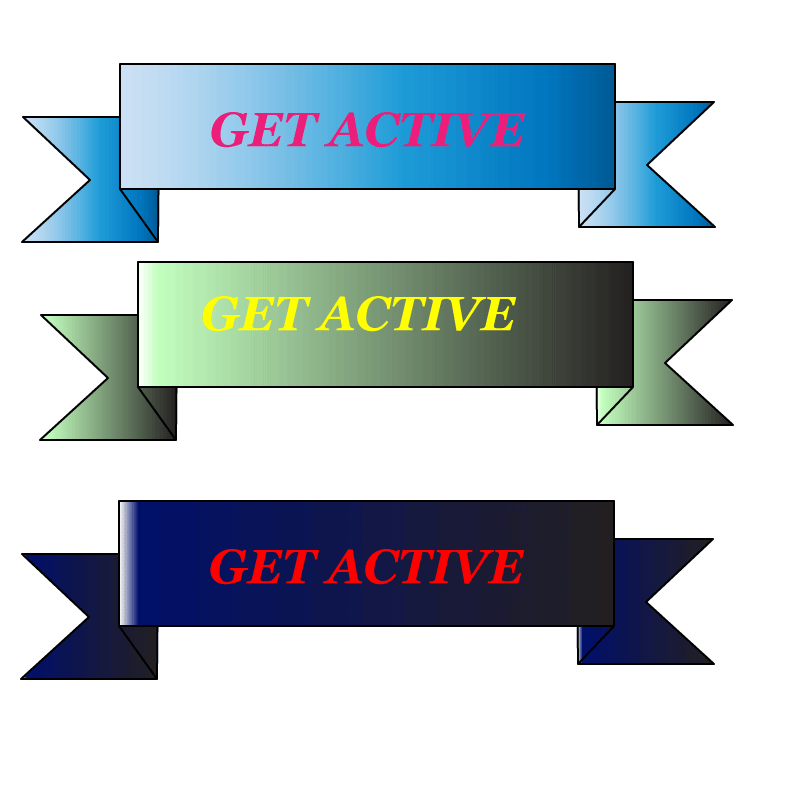
The logo is a idea from m y topic idea which is based on working out and stretching. With that in mind I tried to make my logo likable and appeal to the eye. Since working out isn’t the easiest or quickest to comprehend  thing to do I used a simple phrase to grab the readers attention and still get the main point of working out across. The logo is a draft so I just used the main idea of my topic as a clear idea and point to base my logo off. I used the shape tool to shape the shapes of the banner to a like able shape, this tool came in handy. The pen tool helped with outlining and making the banner stand out more and give it a strong outline. I used a repetitive type of idea to get the idea across to the reader, GET ACTIVE.” The type text tool was used to make the phrase typed through the type text tool allowing me to give my main point across to the reader. Object tool was helpful in the outline of the context of the logo. Logos are cool because you can do so many things with them to get a idea across to a mass amount of people, through a logo. Wanting to give a certain feeling or idea when the reader looks at your logo it should be interesting, simple but yet elegant. This project was fun and challenging but either way I did it. I didn’t use any out side sources. These tools being learned a essential to a business opening or corporation building being able to digitally make flyers and logos and point of views. For work or personal reasons its a good tool to have.e-logo draft

Logo Draft

e-logo draft

The logo is a idea from m y topic idea which is based on working out and stretching. With that in mind I tried to make my logo likable and appeal to the eye. Since working out isn’t the easiest or funnest thing to do I used a simple phrase to grab the readers attention and still get the main point of working out across. The logo is a draft so I just used the main idea of my topic as a clear idea and point to base my logo off. I used the shape tool to shape the shapes of the banner to a like able shape, this tool came in handy. The pen tool helped with outlining and making the banner stand out more and give it a strong outline. I used a repetitive type of idea to get the idea across to the reader, GET ACTIVE.” The type text tool was used to make the phrase typed through the type text tool allowing me to give my main point across to the reader. Object tool was helpful in the outline of the context of the logo. Logos are cool because you can do so many things with them to get a idea across to a mass amount of people, through a logo. Wanting to give a certain feeling or idea when the reader looks at your logo it should be interesting, simple but yet elegant. This project was fun and challenging but either way I did it. I didn’t use any out side sources. These tools being learned a essential to a business opening or corporation building being able to digitally make flyers and logos and point of views. For work or personal reasons its a good tool to have.